
Script Follower

Speech-following script prompter · v0.3.9

New in 0.3.9 · Cuevivo’s active cues, live →

The script that
follows the actors.

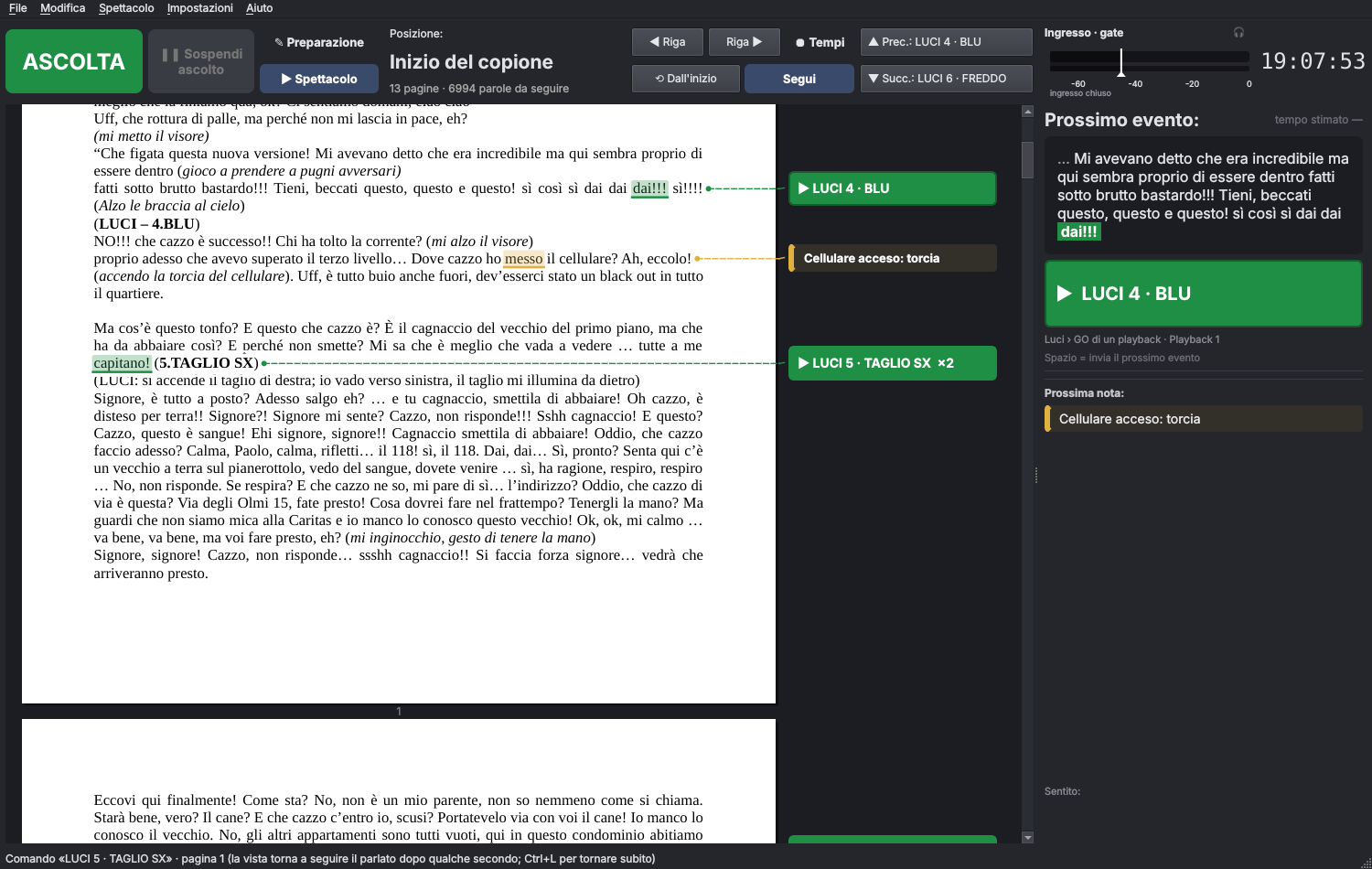
Script Follower listens to the voices on stage, works out where the show is in the script and scrolls the script PDF to the line being spoken. At the points you prepared it shows your notes and lights up OSC cue buttons for Cuevivo, QLab, SCS, ChamSys MagicQ or any OSC device. Offline, free and open source, for Linux, Windows and macOS.

Script Follower during a show: the spoken line is highlighted and the next cue button flashes

What is Script Follower?

In the booth, the operator follows the script and fires every sound, light and video change at the right word. Script Follower does the following for you: it hears the actors through a sound card, finds the line they are saying and keeps the script PDF scrolled there, with the next cue already highlighted.

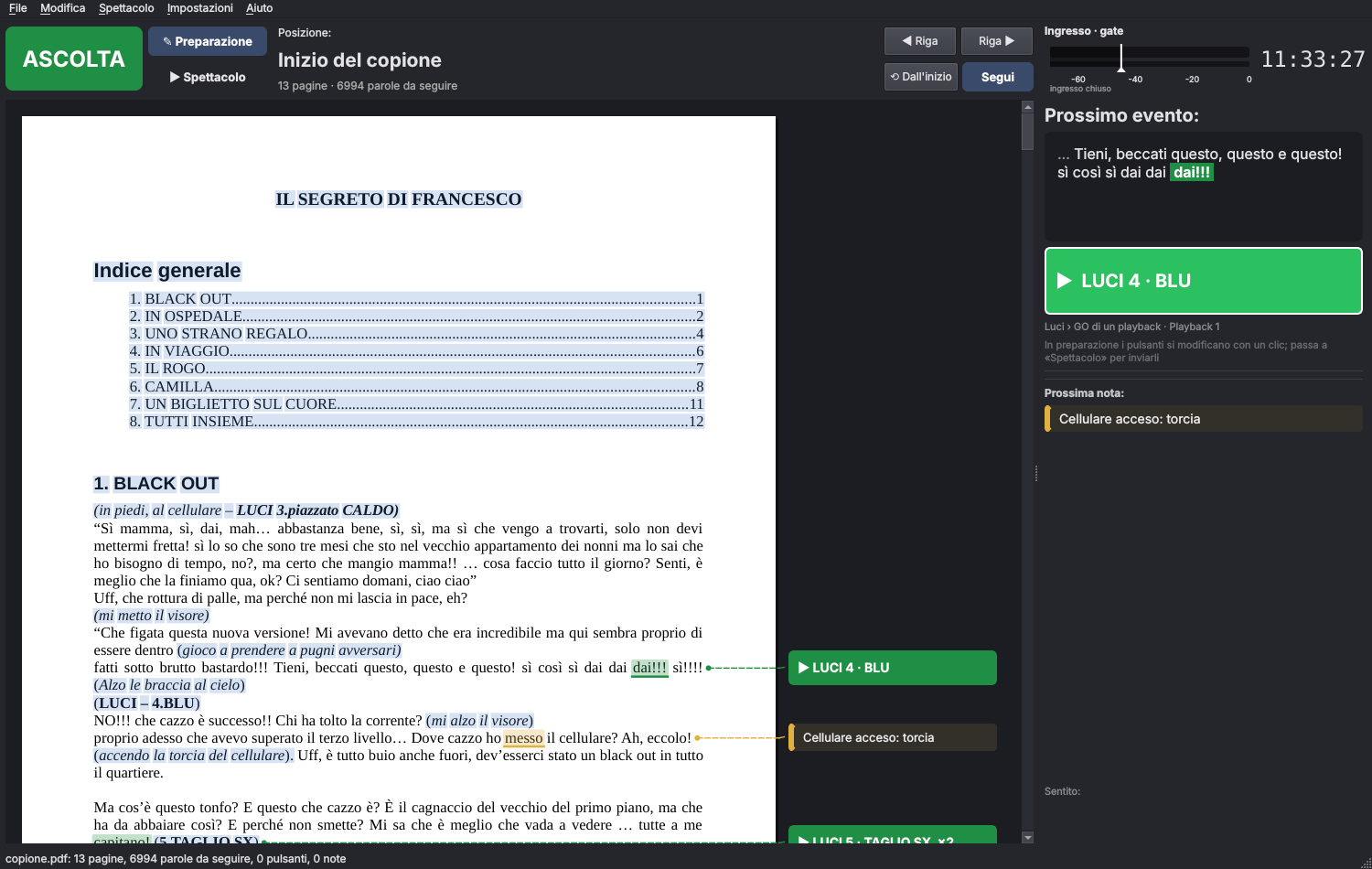
In rehearsal you place OSC buttons and notes on the words of the script. During the show, the button whose word has just been spoken flashes and the space bar sends its commands to your cue software or lighting desk. You stay in control: nothing is fired on its own.

Who is it for?

  • Sound and lighting operators who call cues from the script
  • Stage managers and prompters following a long text
  • Companies touring with a different operator every night
  • Surtitle and accessibility operators who need to know where the show is
  • Anyone using Cuevivo, QLab, SCS or ChamSys who wants the script and the cues together

Current version 0.3.9

What’s new

The latest releases, newest first.

0.3.9 27 Nov 2026

Cuevivo’s active cues, live

Show › Cuevivo active cues (F10) shows what is playing on Cuevivo right now, as in its own panel: list colour, cue type, number and name, a progress bar with elapsed and remaining time, pre-wait in yellow, pause in orange, fades in blue, plus the cue in standby. ❚❚/▶ and ■ pause, resume and stop each cue on Cuevivo from the booth.
Docked or on another monitor

The panel docks next to Next event or detaches into its own window — also on a second screen, also under Wayland (Shift+F10). Row size, hide groups, media only and updates per second are set from ⚙; position and size are remembered.

Follows master, redundancy and master change

Script Follower subscribes to the Cuevivo master and re-subscribes by itself if Cuevivo restarts. If the master falls silent it shows the cues of a redundant instance, and when a secondary is promoted the subscription moves to the new master.

New version notice

At start-up Script Follower checks in the background whether a newer version is available and shows a red “See the new version” next to the Help menu. It never slows the start, stays silent without network and can be turned off in Settings › General.

Clean exit

Closing hides the windows at once and frees sound card, recognition and network in the background: no more hanging windows or forced exits with PipeWire, ALSA or Core Audio.

0.3.8 20 Nov 2026

CueStage is now Cuevivo

The OSC plugin, the network scan and the master-change link follow Cuevivo’s new name. Projects, PDFs and JSON files saved with “CueStage” profiles open with the profiles already moved to the Cuevivo plugin, and versions of the program released under the old name keep working.

0.3.7 5 Nov 2026

Follows the active Cuevivo master

Script Follower introduces itself to Cuevivo every 5 seconds. If the master fails and a secondary instance is promoted, the Cuevivo profiles move to the new master by themselves and the status bar says so; a new master from an unknown computer needs the operator’s confirmation.

0.3.6 30 Oct 2026

Steadier cue buttons

New buttons start with no OSC command, and “+ Add” proposes the profile and command used last. In the Next event panel the button always stays at the same height, and a button pressed early no longer comes back as “to do” at every small step back of the recognition.

0.3.5 29 Oct 2026
Preparation: OSC buttons and notes placed on the words of the script

The show inside the PDF

File › Save to PDF (Ctrl+S) stores buttons, notes, images, included and excluded words, improvised parts, pronunciations, OSC profiles, language, timings and show settings as attachments of the script. Every save rewrites the file cleanly, and the first one keeps a clean copy of the original.

Save once and the whole show lives inside the script PDF, which still opens and prints in any reader.

Show data and vocabulary as files

Export or import all the show data as JSON, images included, to archive it or pass it to a colleague; the vocabulary of pronunciations can be exported and imported as JSON or plain text.

0.3.4 Resizable window: the top bar wraps on two rows, texts are shortened with “…”, dialogs never exceed the screen. Works down to about 650 px wide.
0.3.3 29 Oct 2026

Rehearse with a recording

Show › Try with an audio file (F9, or drop the file on the window) plays a rehearsal recording through gain, gate, meter, headphones and recognition instead of the sound card — at up to 3× speed, choosing the channel of a multitrack file.

0.3.2 28 Oct 2026

English, Italian and Slovenian

The interface is translated, and the script language is saved with the project. English uses Vosk, Slovenian uses Whisper “small” running on CTranslate2; the extra models are downloaded once from the Language menu.

0.3.1 26 Oct 2026

Pictures on buttons and notes

Add photos to any button or note, also by dragging them in. They appear as thumbnails in the Next event panel and open in their own window, full screen with F.

0.3.0 26 Oct 2026
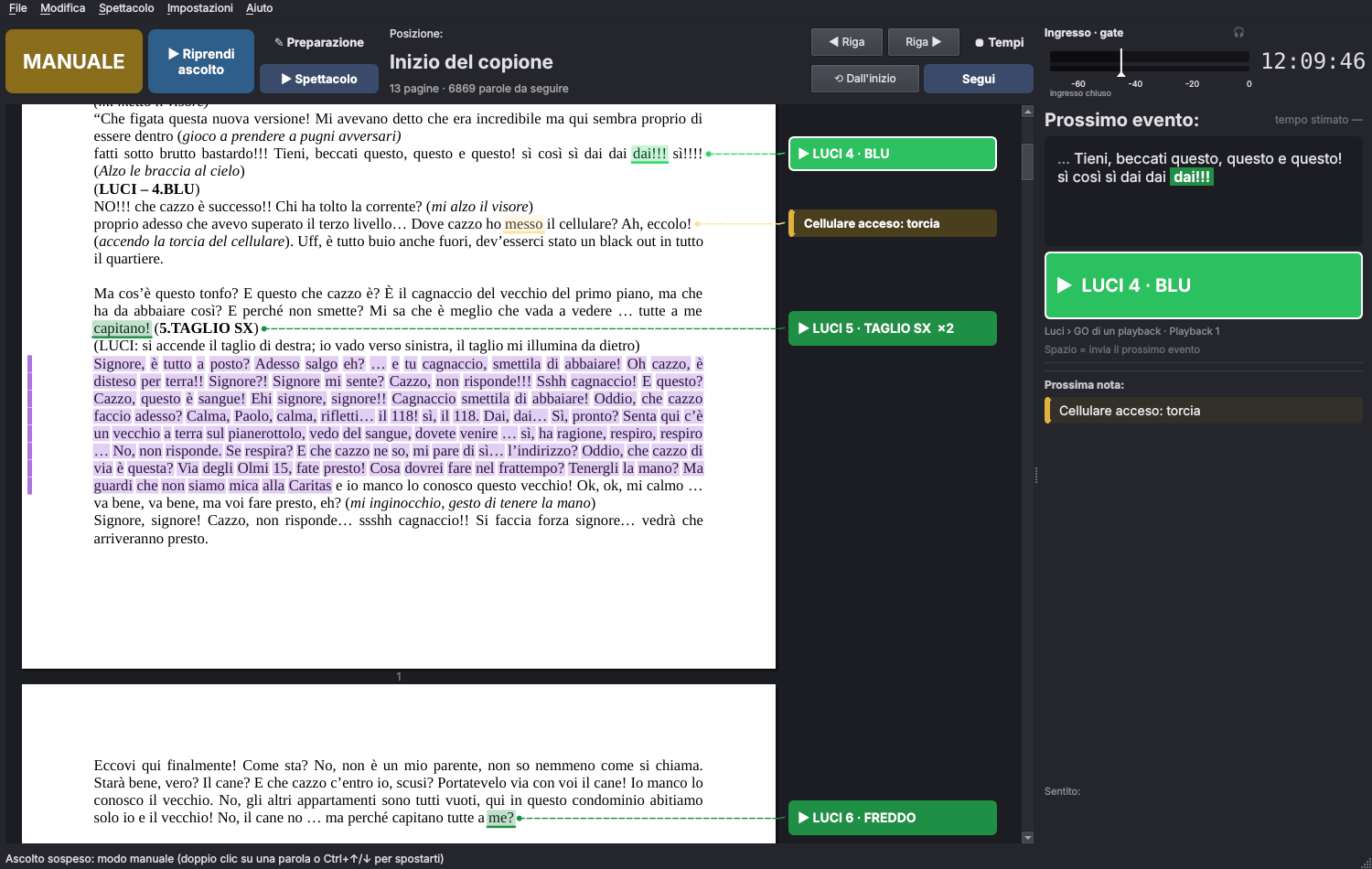
Improvised parts in purple, excluded words in light blue

Network scan and unlimited OSC profiles

As many OSC profiles as you need. Search the network finds Cuevivo, QLab, ChamSys and Art-Net nodes and configures the profiles automatically.

Move between cues

Previous / Next buttons (Alt+↑ / Alt+↓) move the view to the nearby cues without changing the show position; a passed button can be re-armed with a right-click.

Resizable zones

Excluded (light blue) and improvised (purple) zones grow or shrink by dragging their edges, with a preview of the words that go in or out.

0.2.1 20 Oct 2026

First release

Listens to the actors, follows the script PDF and fires OSC cues for Cuevivo, QLab, SCS and ChamSys, with a Next event panel, improvised parts and timings. Portable packages for Linux, Windows and macOS.

What it does

Written in Python with Qt 6, the same stack and look as Cuevivo. Offline speech recognition with Vosk and Whisper.

Listens, offline

Vosk speech recognition runs on your own computer, with the vocabulary limited to the words of the script: small models become very reliable. No cloud, no account. Slovenian uses Whisper (CTranslate2).

Follows the script PDF

The line being spoken is highlighted and kept at a third of the window. Missed words, skipped scenes and ad-libs are tolerated; after a jump — even backwards — it locks on again in a handful of words.

OSC cue buttons

Place buttons on any word of the script. Each one sends one or more OSC commands, in order, to any of your OSC profiles. The next button flashes, and the space bar sends it.

Next event panel

The side panel shows the lines leading up to the next cue — words already spoken in yellow, the trigger word in green — with the operator’s note, photos and an estimated countdown.

Improvised parts

Mark ad-lib passages: the position waits at their start and does not get dragged away by improvised lines, moving on only when the scripted text that follows is clearly recognised.

Notes and pictures

Annotations and photos on any word: they appear in the Next event panel when the show gets there, and open full screen with a click.

Everything inside the PDF

Cues, notes, images, pronunciations, OSC profiles and show settings are saved as standard PDF attachments. The script still opens and prints anywhere; reopen it on another computer and everything is back.

Finds your gear

A network scan finds Cuevivo, QLab, ChamSys consoles and Art-Net nodes, and configures the OSC profiles automatically.

Timing

Records how long each stretch takes, performance after performance, and shows how long is left before the next cue.

Rehearse without actors

Play the recording of a rehearsal (WAV, FLAC, MP3, video with ffmpeg) at up to 3× speed, or simulate speech with typed text and random errors.

Vocabulary tools

Finds the words of the script the voice model does not know — usually names — and lets you give them a pronunciation made of known words. Import and export the vocabulary as a file.

Three languages

Interface and scripts in English, Italian and Slovenian. The Italian voice model is included; the others are downloaded once from inside the program.

New in 0.3.9

Cuevivo’s active cues, live in the booth

Next to the script, Script Follower shows what is playing on Cuevivo at this moment — and lets you pause, resume or stop it without leaving the script.

  • Show › Cuevivo active cues (F10): one row per cue with the list colour, type, number and name, and a progress bar with elapsed and remaining time (∞ for endless cues).
  • Pre-wait in yellow, playing in green, paused in orange, fading in blue — the same colours as in Cuevivo. At the top, the cue in standby and the general pause.
  • ❚❚ / ▶ and ■ on each row pause, resume and stop the cue on Cuevivo.
  • Docked beside Next event or detached in its own window, on any monitor (Shift+F10). ⚙ sets row size, hide groups, media only and updates per second.
  • Times run smoothly between updates. With master and secondaries it follows the master, re-subscribes by itself after a restart, shows a redundant instance if the master falls silent and moves to the new master after a master change.

Always talking to the active Cuevivo master

Cuevivo can run with secondary instances for redundancy. If the master goes down, a secondary takes over — with a different IP address. Script Follower moves its cues there by itself.

  • Every 5 seconds it introduces itself to each Cuevivo profile: the master answers with its name and the addresses of its secondaries, and passes Script Follower on to them.
  • When a secondary is promoted it announces itself as the new master: the Cuevivo profiles that pointed to the old one switch over, Script Follower confirms and the status bar tells the operator.
  • Profiles for QLab, SCS, ChamSys and other devices are never touched.
  • Safe by design: a “new master” message from an unknown computer is applied only if the operator confirms it, and one that concerns none of your profiles is ignored.
  • On or off in Settings › OSC › Cuevivo: master change, with the link status of every profile. Versions released under the CueStage name are understood too.

How it works

Feed it an aux send of the mixer with only the actors’ radio mics — dry, no music, no effects.

1

Listen

The chosen channel of the sound card goes through a gate (threshold and hold): below the threshold the recogniser hears silence.

2

Recognise

Vosk transcribes offline, restricted to the words of the script — far more reliable with small models.

3

Align

The last ~10 words heard are matched with the script around the current position, tolerating errors. It moves only when the match is sure; a jump needs a clearly better match, confirmed twice.

4

Scroll and cue

The line is highlighted, passed cues turn grey and the next button is ready: the space bar sends it.

In simulated runs on a real script, with 30% of the words wrong or lost, the position stays on average within one word. After a jump of hundreds or thousands of words, even backwards, it locks on again in 6–14 words.

OSC plugins

Ready-made commands for the most common show-control software — in the same format as Cuevivo’s OSC profiles — and you can add your own.

Cuevivo · port 53000/go, /cue/N/start, /cue/N/stop, /cue/N/level, /playhead/N, /list/NAME/go, /xfade, /dim…
QLab 4/5 · port 53000/go, /cue/N/start, /stop, /load, /playhead/N, /playhead/next, /panic…
SCS (Pro Plus) · port any/ctrl/go, /ctrl/gotop, /ctrl/goto "Q1", /cue/go "Q1", /hkey/go "A", /fader/setmaster…
ChamSys MagicQ · port 8000/pb/N/go, /pb/N/CUE, /exec/P/I, /pb/N level, /dbo, /rpc…
Generic · port —any address and arguments, typed by hand

Languages

Interface in English, Italian and Slovenian. The script language is saved with the script.

ItalianVosk · vosk-model-small-it-0.22 · 48 MB · included
EnglishVosk · vosk-model-small-en-us-0.15 · 40 MB · downloaded from the program
SlovenianWhisper small (CTranslate2) · 484 MB · downloaded from the program

Screenshots

Click an image to enlarge it.

Download

Script Follower is free software released under the GNU GPL v3. Portable packages, built and tested automatically on GitHub, with the Italian voice model inside.

Linux

A single AppImage with everything inside, nothing to install, for Ubuntu 22.04+, Linux Mint 21+, Debian 12+ and Fedora 35+ (64-bit). chmod +x and double-click.

Audio: PipeWire, ALSA, JACK

Windows

Portable ZIP for Windows 10 and 11 (64-bit): unzip it and start ScriptFollower.exe — even from a USB stick. SmartScreen may warn on the first start: More info › Run anyway.

Audio: WASAPI

macOS

Disk images for macOS 12 or later. First start: right-click › Open, and allow the microphone when asked. Not sure which Mac you have? Apple menu › About This Mac: “Chip Apple M…” = Apple Silicon.

Audio: Core Audio

System requirements

LinuxUbuntu 22.04+, Mint 21+, Debian 12+, Fedora 35+
WindowsWindows 10 and 11 (64-bit)
macOSmacOS 12 or later (Apple Silicon and Intel)
Audio inputA sound card with the actors’ mics (an aux send of the mixer)
ProcessorA recent 4-core CPU for Slovenian (Whisper)
NetworkFor OSC to your cue software or lighting desk

Scripts must be PDFs with text (exported from Word or LibreOffice); scanned scripts need OCR first.

Version 0.3.9 · released 27 Nov 2026 · release notes ·
SHA-256 checksums 581cf82e63263f41847531f098b83d6a30f4d87a5e598b058786399dc6748f50 ScriptFollower-0.3.9-x86_64.AppImage
19ead2c2c1c159a6a6baf20131f297ffa5854523b1bd082645a0fe8b19076945 ScriptFollower-0.3.9-windows-portable.zip
1b6ae0b6ca8cefd3b129350172f80e35f24216c68775c5f26caae82e439e1e22 ScriptFollower-0.3.9-macos-arm64.dmg
ab42c24773b485293edb2aee42eea0d078f040d5dc15cdc765585033f5a6691a ScriptFollower-0.3.9-macos-x86_64.dmg
⚠ Experimental software. Script Follower is still under active development and should not yet be relied on alone in production: keep an operator and a paper script at hand. It may contain bugs and behave unexpectedly; you use it at your own risk, without any warranty. Testing, bug reports and feedback are very welcome.